How a drone moose survey is flown
The mission file is calculated, not drawn by hand. Every number on this page is a parameter in our software, not an aspiration.
What a mission package contains
One package per drone model, as a zip. Inside are four .kmz files per sample plot in DJI's WPML format, one for each route, a map of the sample plots, a field sheet in Swedish as html and pdf, and a list of the files with checksums, so it shows if anything is missing or has been changed.
With the package comes the order of visits, how the visits fall across field days, and a suggested launch point for each sample plot. The suggestion is just that, and the final choice is made on site from access, visibility and a clear climb. If a plot cannot be reached it is not flown, and it is never swapped for another plot, because the hard-to-reach plots may well be the ones holding the most animals.
How the routes are built
The parameters follow SLU Rapport 2026.2 wherever the report gives them, with one exception: we photograph more densely along the line than SLU did, so that every point is seen in at least three photos. It costs no flight time, only more photos, and gives more chances to see an animal between the trees. Height, speed, overlap and plot size are the same in the calculation as in the routes below, so what is written here is what is flown. Each drone model gets its own mission file, calculated from that sensor's field of view, so the same sample plot is flown differently by different models.
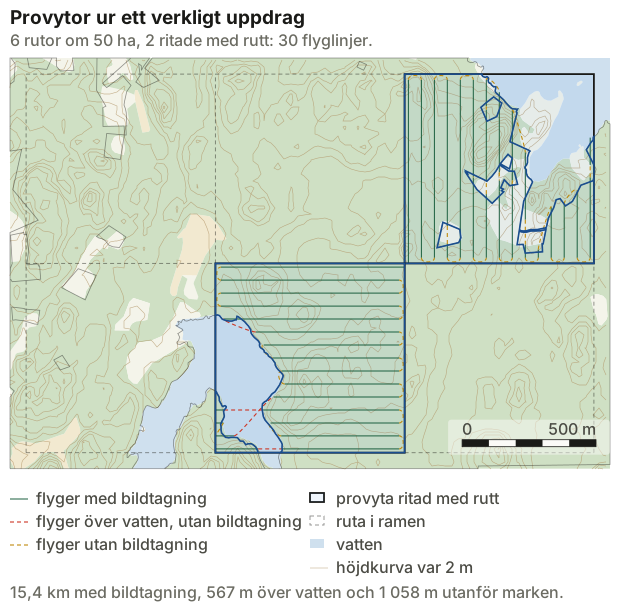
The route does not stop without reason. The drone turns between flight lines without braking, and where a line crosses water or land outside the property it flies straight over instead of stopping at the edge. Every stop costs braking, turning and accelerating again. On a plot like the one bottom centre in the figure we expect the flight time to be 21–30 % shorter.
Each sample plot gets four routes, two directions and two starting sides. In calm weather the shortest is flown. If it is windy, the pilot chooses on the day the one that runs across the wind and starts downwind, so the wind helps the drone home when the battery is at its lowest.
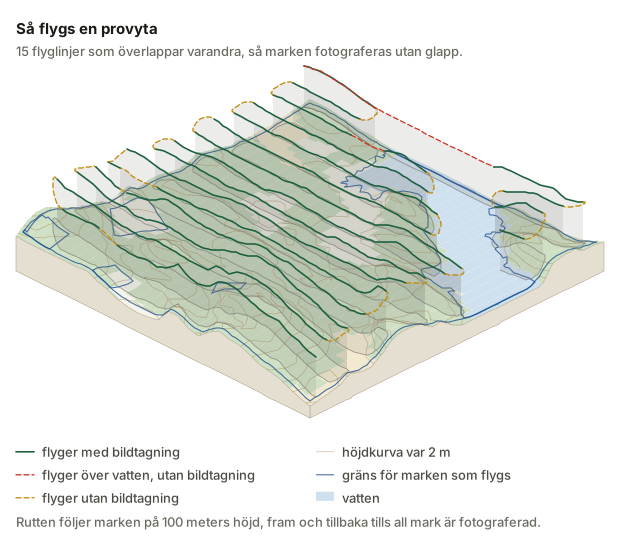
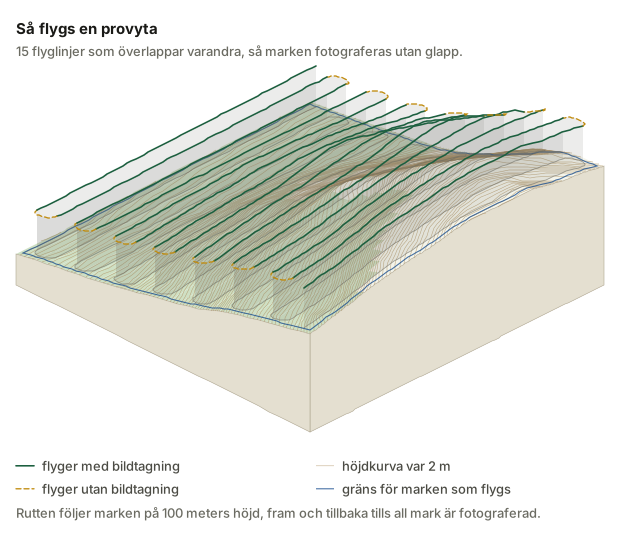
- 100 m above the ground, not above the launch pointHeight is measured against the ground directly beneath the drone, not against the place it took off from, so it is the same down in a hollow as up on a hill. The route stays within five metres of 100 m above ground. Counted from the launch point it would follow the launch point instead: twenty metres too high and it hits the ceiling, twenty-five metres too low and gaps open between the photos. The drone flies at 9 m/s with the camera pointing straight down, 90 degrees, and every photo is taken with two cameras, a thermal camera and an ordinary one. The photos overlap 25 % sideways and 67 % forward, so that no ground falls between them. The spacing between flight lines is calculated from the camera that will actually fly, so another drone model gives a different line spacing and a different flight time.
- Sample plots of 50 haThe same size SLU calculated its spread on, so the measures can be compared. Edge squares are clipped to the area boundary, and a square with less than half land does not count as a sample plot.
- A quarter are flown againThe repeat flights are in the package as files of their own. They measure the detection rate, and without them the whole survey is a lower bound of unknown depth.
- Take-off and finishThe drone climbs straight up to 50 m before heading for the first waypoint, and flies home when the route is done. On loss of link the default is to return, which suits flying within visual line of sight. If the flight is beyond visual line of sight under a permit of its own, the procedure that permit requires is written into the file instead.
What we remove before anything takes off
Every sample plot is checked against five sources before it goes into a package. What is impossible to fly is removed as soon as the grid of plots is laid. What can be flown with a permit or with care goes along as a flag on the field sheet, with the name of the area, so no one has to look it up themselves.
- AirspaceRestricted areas and control zones (CTR) from LFV. An area whose remark bans drones, or refers to the Swedish Transport Agency's special permit, is excluded. An area that states who grants permission goes along as a flag with that information. An area that only requires a NOTAM is flagged as such.
- Protected areasNational parks, nature reserves and areas closed to access from Naturvårdsregistret. National parks are excluded. Reserves are flagged, because their regulations differ from one to the next.
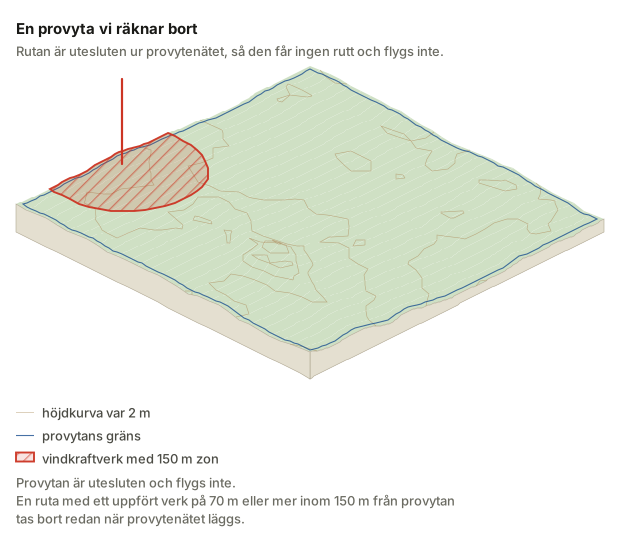
- Wind powerBuilt turbines from Vindbrukskollen, with total height. A square with a turbine of 70 m or more within 150 m of the sample plot is excluded, because the route sits at 100 m. Turbines still under review are flagged instead.
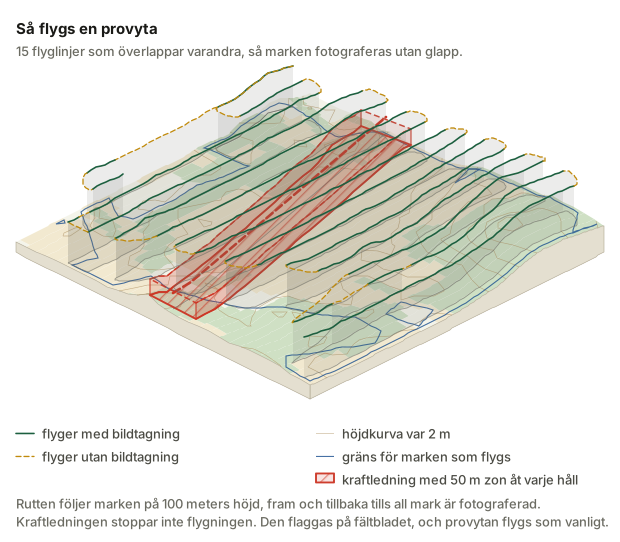
- Tall obstaclesPower lines, masts, towers and chimneys within 150 m of the sample plot. They do not exclude a plot, they are flagged, because the route at 100 m clears pole heights of twenty to thirty-five metres. A launch point is never suggested closer than 50 m to a power line's centre line, though, or 150 m to a mast, a tower, a chimney or a wind turbine.
- WaterLakes, sea and watercourses from the map data. Water is subtracted from a square's land area, and a square left with less than half land does not become a sample plot.
This does not replace the check on the day of flying. UAS zones and temporary restrictions exist only in Drönarkartan, LFV's drone map, and it is read before every flight. Our source data is dated and kept with the assignment, so it is always possible to see how old it was when the route was calculated.
Every file is read back before it leaves us
Once a .kmz has been written, the software opens it again and checks the contents against DJI's format and against our own parameters. A file that cannot be read back is not sent.
The whole pass is then measured from the files themselves: ground heights, the deviation from 100 m, flight time, climb and descent, and how much of the flight lines lies over water. If a file is missing, has been changed, or the flight time does not match the list, the package does not go out.
The field sheet: the flags and the checklist the pilot carries
The field sheet carries the sample plot's flags and a checklist that belongs to that particular assignment. It says, among other things, that Drönarkartan is to be read before every flight, that a plot in a control zone needs air traffic control's permission every time, that the landowner is to be notified, that no flight happens over land where hunting is under way the same day, and that no one is ever told where the moose are while the flight is under way.
It also says that the flight is called off if the sun comes out. SLU flew in overcast weather to get the greatest possible thermal contrast between animal and ground, and that detail decides how much the survey actually sees.
Read on about moose surveys
- The method behind the moose survey What we build on, and where we have taken it further.
- Moose surveys for landowners What you get, what we need from you, and what a season looks like.
- How to read the survey report What a confidence interval means, and when a number cannot be used.
- Rules and obstacles we check against (in Swedish) Airspace, protected areas and tall obstacles, excluded or flagged.
- Compared with other ways of counting moose (in Swedish) Helicopter, pellet counts and hunter observations, and when a drone is the wrong choice.
Contact
Do you have a drone model we have not calculated for, or want to check the parameters against your own data? Get in touch.